
 M. DAWSON
 J. CLARKE
 M. SMOLEN
 E. FER
 C. KUHNLE
 M. CHOURRAUT
 M. BENUS
 F. ANTON
 L. BOZIC
 K. HOSKOVA
 J. FOX
 BREZINSKI/BREZINSKI
 A. PETERS
 V. KHUDZENKA
 E. MEDVECKZKY
 GRIJIC/NOVAKOVIC
 L. QIANG
 M. DE JONGE
 R. POULSEN
 A. CHERVOVA
 S. TARNOVSCHI

 J. MOCKE
 E. LEVEMYR
 S. RAFAEL
 H. TAKAKU
 M. GRAZIANI
 J. EGAN
 N. LJUBEK
 MINDE/HAMAR
 PINTA/MOZZICAFI
 S. LAMMLER
 A. BUSLAIEVA
 M. WEGMAN
 S. REINOSO
How to Get ALL Notifications from the Sportscene Facebook Page
By “Liking” the Sportscene Facebook Page, you’ve chosen to become a fan so that you get the latest news in the world of competitive paddlesports, but the downside is that simply liking a Page does not ensure that you can see all our posts.
In fact, the median reach of Facebook posts by a Page to a fan is 16%. In plain English….fans typically see only 16% of the posts a brand makes on their Facebook Page!
Facebook offers a solution for Pages to get “Notifications” from any Page
Notifications alert a Facebook user every time a page makes a post, just like a user is alerted to a post on their wall or a comment a friend makes on their posts. Notifications are a great way to stay in touch with all that Sportscene is posting.
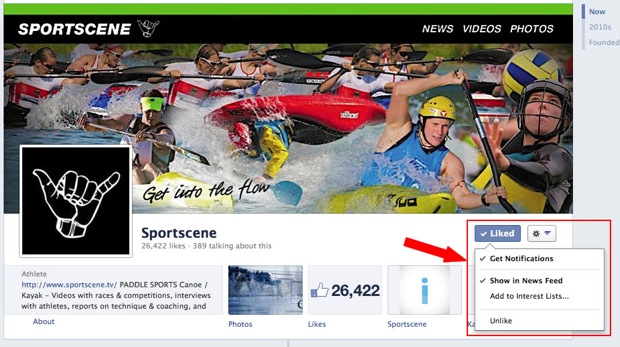
To Activate Notifications for the Sportscene Page:
- Navigate to www.facebook.com/sportscene
- If you haven't done so already “Like” the Page and continue hovering over the “Like” button
- When the drop down menu appears, select Get Notifications (see image above)
This will then activate notifications to you for the Sportscene Facebook Page.
Viewing Notifications
Notifications alerts of a new post will appear in your Facebook Notification area. A red square with the number of new notifications that you have not yet viewed appears at the top of the Sportscene Facebook in the web, mobile, or mobile app versions of Facebook.
Simply click on the Notification globe button to see a quick view of the each and then click on one to go to view the full post.
